How Can Bay Area SLPs Repurpose One Video Across Their Website, Social Media, And Ads?
Key Takeaways
SLPs in the Bay Area can repurpose one quality video across their website, social media, and ads.
That involves defining a message and a production strategy that allows you to easily repurpose one video for your website, your social media account, and your ads.
Slicing your videos into pillar content, website features, social media snippets, ad creatives, and email clips allows you to speak directly to where someone is at, increasing engagement at every step.
By tailoring the video’s format and message for each platform, leveraging analytics to optimize approaches, and interacting personally with followers, you're creating a more powerful online presence and community.
Using professional editing tools, automation platforms and video hosting services makes the content creation more efficient and provides useful metrics for ongoing optimization.
Privacy compliance and impact measurement for every campaign ensures responsible marketing and sustainable success for SLPs in the Bay Area and beyond.
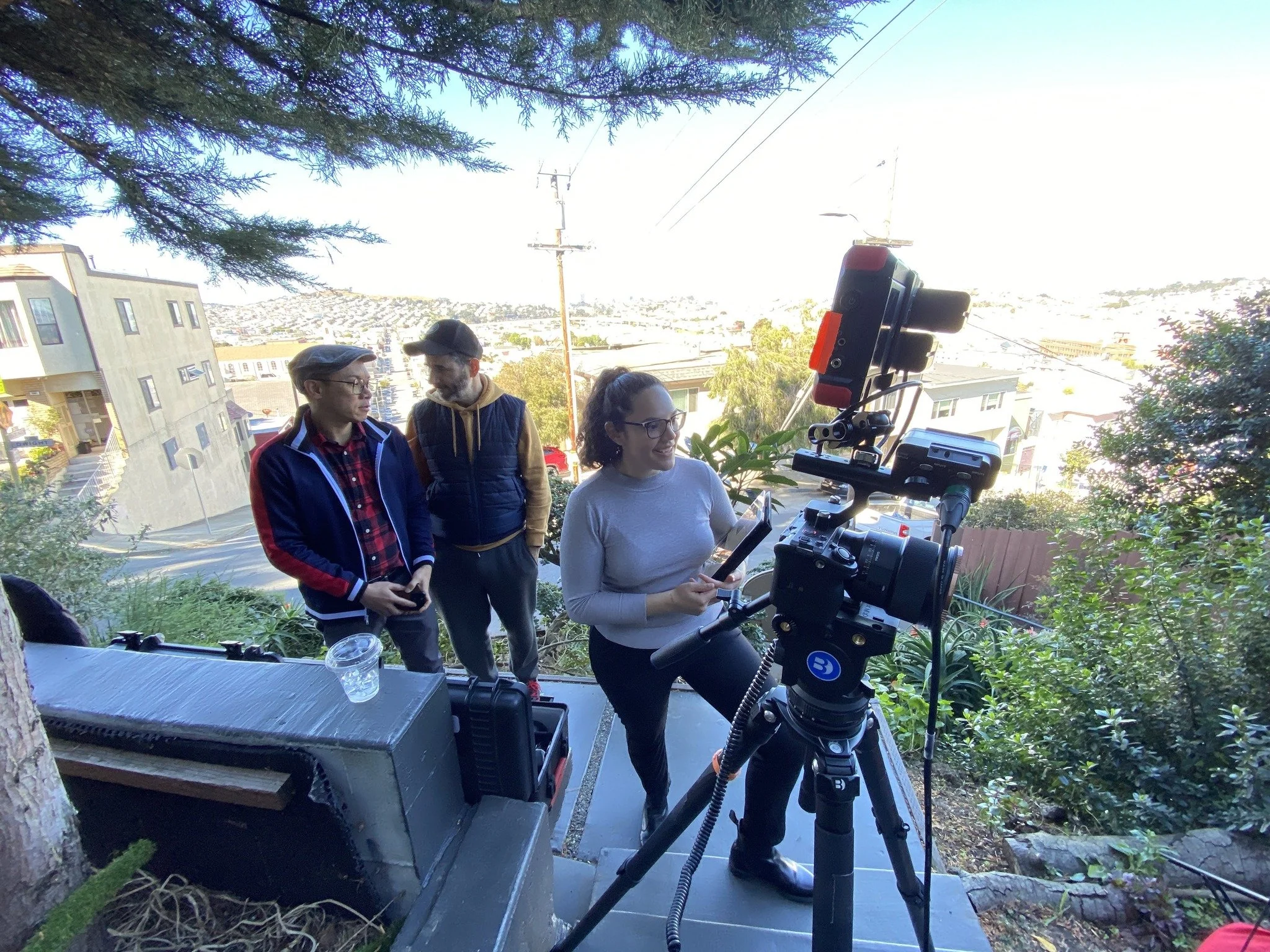
To use one video across a website, social media, and ads, Bay Area speech-language pathologists (SLPs) can trim, crop, and change the file type to fit each platform. Most Bay Area SLPs want a consistent brand aesthetic, so repurposing helps save them time and maintains the look across the board. For a website, full-length clips are best. Social media requires brief, attention-grabbing clips with captions in a square or vertical format. For ads, quick cuts and attention-grabbing words attract the most attention. Platforms such as Canva or Adobe Express can segment and resize clips in a few clicks. Picking the right fit for each spot helps SLPs get more reach with less effort. The following easy steps illustrate this process, with guidance from Peakbound Studio for maximizing efficiency and impact.
Why Repurpose Video?
Repurposing one video across your website, social media platforms, and ads offers a distinct set of advantages for SLPs and other pros who want to work smart with their digital content. By taking one key video and utilizing video marketing strategies to repurpose it across channels, you can scale the impact of your message, save time, and keep your audience engaged without the stress of producing yet more content. For SLPs in the Bay Area and beyond, this approach is manageable and effective, enabling you to accomplish more with less while maintaining sharp communication.
Posting one quality video everywhere means more eyes on your work. Since every social media platform has its own audience and reach, your content can land in front of new audiences every time you post it. For instance, you could post a comprehensive video of speech exercises on your website for clients to view at their own leisure. That same video, sliced into short videos, can be shared as Instagram Stories or TikTok posts, where folks are hanging out. This aids in discoverability and increases engagement as users respond to social media content that suits their preferences. Some may like short, punchy tips, while others may want a full walkthrough, repurposing enables you to do both.
Killing time and resources is all about working smarter, not harder. Creating a glossy, tightly-edited video requires work, but once you have it, you can trim it in various ways to suit a bunch of different uses. Make a centerpiece video for your website, then chop it into clips for social media posts, or transform the highlights into snappy video ads. It prevents us from reinventing the wheel for every channel and ensures that your fundamental message remains consistent, reducing the potential for mixed messages within your audience.
Repurposing benefits discoverability and content longevity. With a few tweaks to your titles, tags, or keywords on each platform, your video stands a better chance of appearing in searches or feeds. On ephemeral platforms like Instagram Stories, repurposed clips keep your message fresh and frequent. Testing edits and styles teaches you what resonates most with your target audience, allowing you to hone your video marketing strategy with no additional effort.
Maximize reach
On a website, videos reach a broad audience.
On social media, they target specific segments.
In ads, they help attract new leads.
Save time and resources
For websites, one core video can be used.
On social media, that same content is turned into quick clips.
In ads, the main footage is reused efficiently.
Boost engagement
On websites, videos provide full details.
On social media, short and catchy edits grab attention.
In ads, videos use direct calls to action to drive response.
Extend lifespan
On websites, videos serve as evergreen content.
On social media, frequent updates keep content fresh.
In ads, videos support ongoing campaigns.
Improve discovery
On websites, videos are placed on SEO-optimized pages.
On social media, hashtags and tags improve visibility.
In ads, platform targeting helps reach the right audience.
Ensure consistent messaging
On websites, the video acts as a central source of information.
On social media, the tone is adapted while keeping the same message.
In ads, the brand message remains unified across campaigns.
Your Core Video Blueprint
Your Core Video Blueprint allows Bay Area SLPs to maximize one principal video across their website, social media platforms, and advertising. The concept is to leverage each second by strategically planning, editing, and distributing quality video content that saves time and connects with more audiences. With support from Peakbound Studio, this approach ensures accessibility, relevancy across channels, and efficient use of digital tools.
1. Pillar Content
Select subjects that are most important to your target audience and develop them into comprehensive social media videos. Your “pillar” videos serve as the foundation for all your other video assets. Then you can create short snippets from these for social media posts or highlight reels. Link your blog posts to these pillar videos to provide additional context and assist search engines. Request viewers to discuss your core videos, as their responses will guide your video marketing strategy for improved entries next time.
2. Website Slice
Place social media videos on your home pages to jazz them up and keep visitors there longer. Create landing pages for key subjects, such as therapist tips or client journeys, where users can educate themselves and book a session. Including transcripts on your video pages will assist with accessibility and boost your site’s ranking. Keep your video marketing strategy fresh by updating often so your website never feels stale.
3. Social Snippets
Snip out punchy moments from your long video for social media content. Alter the appearance and duration of these clips for each platform, such as Instagram Reels or YouTube Shorts. Spice it up with bold captions and the right hashtags to attract new audiences. Schedule your social media posts for consistent sharing with a content calendar.
4. Ad Creative
Take snippets from your core video and create social mirror ads targeting new customers. Experiment with ad formats, such as skippable and short overlays, to test what performs best in your video marketing strategy. Check your stats to find out which video ads generate the most sign-ups, and always close with CTAs so viewers know what steps they should take next.
5. Email Nugget
Drop video clips into email newsletters for a live splash and enhance your social media presence. Segment your list so each receives quality video content that speaks to their needs. Monitor who views your videos and leverage this information for your video marketing strategy.
Key elements of an effective video production timeline:
Establish your core message and desired outcome.
Script and storyboard your core video.
Plan shoots, edits, and reviews.
Content release calendar for full launch, social cuts, and ads.
Edit or use AI to resize clips.
Easy analytics for each channel.
Update strategy based on performance information.
Platform-Specific Plays
Are about molding a single video to suit each place you post it, whether it is a website, social media, or ads. That way, SLPs in the Bay Area can benefit the most from every video they produce. Each site has a distinct look and rules. Individuals scroll at lightning speed on Instagram or TikTok but linger on a website or LinkedIn. Some view highlights, while others crave nuance. You make intelligent edits and switch up how you share to reach more people without having to shoot new clips for each location.
Platform-specific plays, cut and edit for each platform. For Instagram Reels or TikTok, keep the video short. Fifteen seconds is ideal. Feature a tip or highlight from your primary video. For LinkedIn, identify a key quote or fact and leverage an audiogram with captions. Twitter (now X) plays well with bite-sized teaser clips or threads sharing key takeaways. For your site, use the full video or a longer highlight. This allows those who want the specifics to locate them all in one convenient location.
Leverage platform analytics. There are tools on Facebook, Instagram, or YouTube that display what viewers enjoy, how long they remain engaged, which segments they fast-forward through, or what prompts comments. Watch these numbers posted. If they quit watching all at the same place, trim that next time. If a short tip gets more replies, post more. Analytics lets you see what works, so you can adjust your next video. It saves time and helps your videos mold to what people want.
Cultivate a community through interaction. When a person comments or shares your video, respond to them. Pose questions in your post to initiate a conversation. Thank the commenters. The more you talk with viewers, the more they will come back or tell others. Be sure to respond in a platform-appropriate fashion. Respond short on Twitter and more on LinkedIn. This enhances the value of your video and your online space.
Tools For Efficiency
SLPs in the Bay Area who want to maximize one video can utilize various tools to reduce time and expand their audience. With good video editing software (think Adobe Premiere Rush, DaVinci Resolve, or CapCut), SLPs can easily cut, trim, and caption without much hassle. They make it easy to segment a lengthy video into bite-sized clips that suit various social media platforms, such as a five-minute explainer for your site, a one-minute highlight for Instagram, or a Facebook story. Tools such as Wibbitz and Lumen5 assist in extracting the most compelling moments from lengthy videos and transforming them into shareable clips or audiograms, ideal for podcasts and social media videos, Peakbound Studio can help select and integrate the best tools for your workflow.
A checklist can help SLPs select the appropriate tools and avoid overlooking any steps. Begin with video editing software that allows for HD export and convenient resizing. Include a tool for creating audiograms, like Headliner, to transform video sound bites into audio that can be shared. Select a tool such as Canva or Piktochart for creating infographics, which can transform complicated speech data into easy-to-read visual content. Seek out tools that assist in chopping up your videos into short, attention-grabbing clips, because people scroll fast. A social media content strategy can be enhanced with a social media post generator, such as Buffer or Hootsuite, which can create and schedule posts from the same video, so the content reaches more folks with little added effort.
Automation tools are important for maintaining a strong social media presence. Platforms such as Later and Sprout Social can schedule when videos go live on various sites, which keeps a consistent online presence without having to post manually each time. Social media automation facilitates ad campaigns, as various clips or audiograms can be quickly assessed as video ads with minimal manual labor. Automation can span time zones, so videos reach a worldwide audience 24/7.
Services like Vimeo or YouTube provide more than just video storage, they also offer analytics to see who watches, how long, and what gets re-watched. This information allows SLPs to see which clips perform best and where to prioritize next. With analytics, SLPs can determine if their repurposed videos achieve their objectives, whether it is more visits, shares, or sign-ups. Keeping track of these figures assists in optimizing the video marketing strategy and enhancing each video's future usage.
The Bay Area Privacy Check
Privacy first, when Bay Area SLPs want to use one video across social media platforms and ads. Social media video content provides a feast for engagement, but distributing that content comes with data privacy concerns, particularly when dealing with sensitive information like personal health or client stories. The Bay Area Privacy Check highlights the region's eclectic market, defined by stringent state and local laws, which demand that SLPs treat privacy compliance with respect. Knowing these laws safeguards clients, maintains trust, and protects practices against expensive fines.
General Data Protection Regulation (GDPR)
This is an EU-wide regulation governing how personal data is processed.
A best practice example is obtaining clear consent before using client videos.
California Consumer Privacy Act (CCPA)
This law gives consumers the right to know and control what data businesses collect.
A best practice example is adding a privacy notice on all landing pages.
HIPAA
This is a U.S. law that protects sensitive health information.
A best practice example is masking client faces or using actors when necessary.
Regular privacy audits
This practice involves routinely reviewing how client data is collected, stored, and used.
A best practice example is checking consent forms every quarter.
Clear privacy policy
This explains how viewer and client data is used.
A best practice example is creating a simple, easy-to-read privacy policy page.
Get your privacy policies out to the viewer at each place the video is present. When reusing video for the site, stick a privacy link near the video player or embed a short form video explaining how data is used, such as tracking views and collecting feedback. On social media, put a pinned comment or caption referencing the privacy policy. For video ads, make disclosures easy and prominent, so people understand what data may be collected or tracked.
Review privacy practices often, at least every six months, to stay ahead of new rules and tech shifts. Laws such as CCPA or GDPR evolve, and social media channels adjust their privacy options or advertising targeting capabilities. Routine audits keep SLPs out of hot water with the law and let the public know they can trust them. Real-world examples from other industries, like the car business, demonstrate why this is important. Dealerships shift their privacy stance as consumers and regulations evolve, holding regular KPI reviews and pivoting strategies to maintain customer retention and growth while staying compliant.
Measure Your Impact
Tracking how a single video performs across your site, social media platforms, and ads is crucial for Bay Area SLPs who want to make savvy decisions and maximize their time and dollars. Understanding what is most effective allows you to waste less on trial and error and more on what delivers. Impact isn’t always straightforward or immediate to measure because it is hard to capture things like trust or long-term client growth. It is important to set clear goals first. Determine if you want additional site visits, increased social shares, or improved client leads. This foundation helps you measure progress and identify what is due.
Key metrics for video marketing include A/B testing, a practical way to see what type of video grabs your target audience best. You can experiment with shorter social media videos and longer, in-depth ones on your site. For paid ads, try different calls-to-action or video thumbnails. By measuring which version gets more clicks or leads, you can maintain what works and trim what doesn’t. This process is time-consuming, but it eliminates guesswork. For instance, if a video with a testimonial performs better than stock footage, you know to use more real stories in your video marketing strategy. Peakbound Studio emphasizes data-driven decisions to maximize results.
Number of views on each platform
Engagement rates (likes, comments, shares)
Completion rate (how much of the video people watch)
Click-through rate (how often viewers follow links)
Conversion rate (how many take a key action)
Cost per result refers to how much you spend for each lead or action.
Qualitative feedback (comments, messages, or survey responses)
Unforeseen consequences are positive or negative results you didn’t anticipate.
Gathering feedback via quick surveys or soliciting comments on your social media posts allows you to identify what viewers enjoy or value. It also helps you catch any bad press early, so you can address problems before they escalate. For example, if your international viewers find a video difficult to comprehend, you can subtitle it or redesign your script to improve engagement.
Gather feedback via quick surveys or by soliciting comments on your posts. This allows you to identify what viewers enjoy or value. It allows you to catch any bad press early, so you can address problems before they escalate. For example, if your international viewers find a video difficult to comprehend, you can subtitle it or redesign your script.
Ultimately, effective video marketing hinges on your ability to adapt and refine your approach based on audience feedback and performance metrics. By continuously analyzing your video assets and adjusting your social media content strategy, you can enhance brand awareness and achieve your marketing strategy goals.
Final Remarks
To get more from a single video, clever Bay Area SLPs, with guidance from Peakbound Studio, slice and mold their work for every platform, website, social media, and ads. Small pieces can fit in Instagram Reels or Facebook clips, while full stories can sparkle on your site. Short bits can hook folks in paid ads. Every space has its own style, so adjust sound, captions, or duration. Mind privacy, blur faces or change names as necessary. Look at the stats to see what works. One good video can go a long way and save you a lot of time. With Peakbound Studio’s tools and strategies, keeping your content fresh and efficient is easy. Ready to watch your reach explode? Try this mix-and-match plan and see how far one strong story can stretch.
Frequently Asked Questions
1. How Can Bay Area SLPSs Repurpose One Video For Multiple Platforms?
Begin with a center video to create quality video content. Customize it for each social media platform’s format and target audience. Use shorter clips for social media videos, longer versions on your website, and customized edits for video ads, saving you time while keeping your message streamlined.
2. Why Is Repurposing Video Content Important For SLPs?
Repurposing social media videos is time and resource efficient. It gets your messaging in front of more people on various social media platforms, keeping your brand top of mind and audiences engaged.
3. What Tools Help SLPs Repurpose Video Efficiently?
Utilize video editing platforms such as Canva, Adobe Premiere Rush, or InShot for creating quality video content. These tools provide templates, resizing, and simple exporting for various social media platforms, enhancing your video marketing strategy.
4. How Should SLPs Address Privacy When Sharing Videos Online?
Always have client consent before sharing any social media videos containing personal information. Verify with local privacy laws, such as California’s, and adopt best practices for video marketing to keep client information safe.
5. What Metrics Should SLPs Track To Measure Video Impact?
Monitor views, engagement, shares, and conversion rates of your social media videos. These metrics illustrate how your video marketing strategy is performing on each platform and assist you in honing your content marketing strategy.
Video Marketing Built To Help Speech Therapists Grow
Ready to make video a consistent driver of trust, referrals, and new client inquiries for your practice? Partner with Peakbound Studio to create strategic, professional videos designed specifically for speech-language pathologists. From brand and clinic story videos to testimonials, social media clips, explainer videos, and video ads, we help SLP practices communicate clearly, connect with families, and stand out in competitive Bay Area markets.
Whether your goal is to educate parents, build confidence before the first appointment, support referral relationships, or improve conversions on your website and ads, our team handles everything from strategy and planning to filming, editing, and post-production. Reach out today to start building video content that works across your website, social media, and marketing campaigns, and supports long-term growth for your practice.